
Quick Summary
- AI search prompts Google Search Console reveal how users ask real questions, helping you move from keyword targeting to true intent-driven content strategies.
- Google Search Console AI queries show high-intent, long-tail searches that indicate what users actually want before making a decision.
- Understanding how to track AI searches in GSC helps you identify impressions with low CTR where AI is using your content without clicks.
- Google AI Mode search data highlights zero-click behavior, making impressions a critical signal for visibility and demand.
- Use AI search trends and AI-generated search data to identify gaps, improve content, and stay ahead of shifting user behavior.
- Master how to analyze long-tail queries and how to extract insights from Search Console to continuously update content and build compounding SEO growth.
Your customers are no longer typing short phrases into a bar to find products. They are now using AI search prompts to ask detailed questions like “What is the best eco-friendly running shoe for flat feet under one hundred dollars?”
As an e-commerce marketing agency, we know that capturis high-intent trafing thfic is the key to scaling. This data is already hidden in your dashboard, and when you connect it with AI search prompts in Google Search Console, you can start optimizing for Google AI Mode before your competitors do.
What Are AI Search Prompts and How They Work in Google Search Console
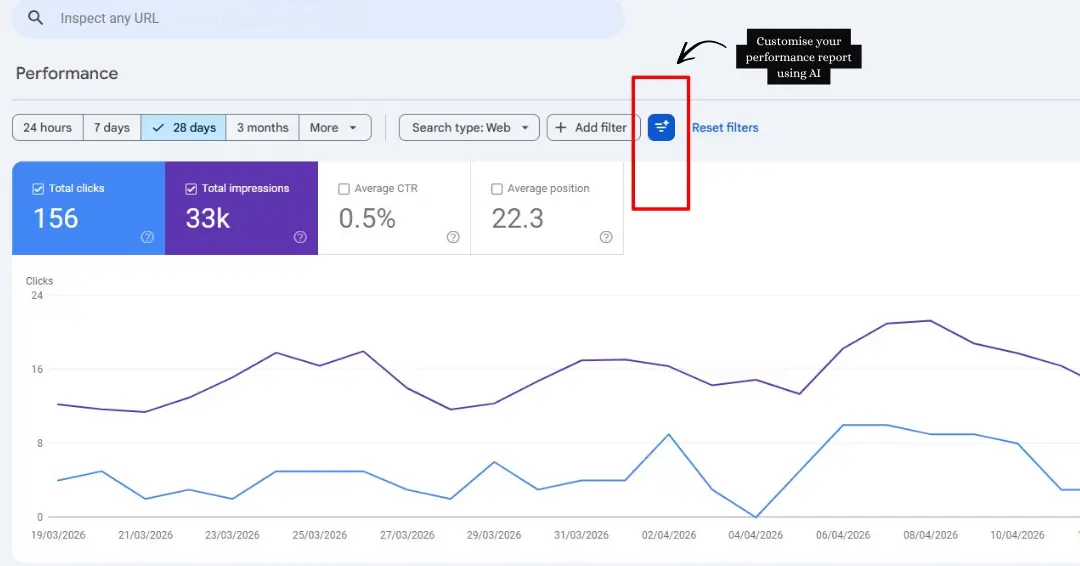
Your customers are not searching the way they used to.
Instead of typing “buy running shoes online” they are now asking things like
- “What are the best running shoes for flat feet under £80 that arrive within 2 days”
- “Which online store sells organic skincare that is cruelty free and ships to UAE”
- “Is it better to buy a gaming chair from Amazon or a specialist store with warranty support”
These are not keywords. These are full conversations happening inside ChatGPT, Google AI Mode, Perplexity and Gemini every single day.
And here is what changes everything for your ecommerce business. Some of this data is already sitting inside your Google Search Console. You just need to know where to look, how to read it, and how to connect it with AI search prompts Google Search Console insights.
Brands that understand Google Search Console AI queries are already writing content that matches how buyers actually think. They are showing up inside AI answers, capturing high-intent traffic, and converting at rates that traditional keyword targeting simply cannot match anymore.
The ChatGPT Query Leak And What It Proved About Buyer Behaviour
A batch of ChatGPT search queries accidentally leaked into Google Search Console data across multiple websites. These were not normal searches. They were full conversational prompts structured exactly the way someone would type into an AI tool.
Queries like
- “What ecommerce brand sells sustainable activewear that is good quality and not overpriced”
- “Compare protein supplement brands online which one has best value for money in UK”
Real buyers are typing full AI style prompts before making purchase decisions. And that behaviour is now permanently woven into how people shop online. This is not a future trend. It is happening in your niche right now.
How Google AI Mode Search Data Shows Up In Search Console
Here is where ecommerce brands need to pay close attention.
Google AI Mode sits at the very top of search results. It generates an AI answer before the user ever sees a product listing or a category page. When your web page gets cited inside one of those AI answers, Google Search Console logs it as an impression.
This is real, confirmed Search Console AI data, and it tells you something incredibly valuable about demand in your market. When you analyse AI search prompts Google Search Console data, the breakdown becomes even clearer for ecommerce specifically.
Search Behavior: Traditional vs. AI Mode
| Metric | Traditional Search | Google AI Mode |
| Average Query Length | 2 to 4 words | 8 to 15 words |
| Click-Through Rate (CTR) | 3% to 6% | Often under 1% |
| What the Data Tells You | Which keywords rank | What buyers actually want to know |
| Content That Wins | Product and category pages | Buying guides and Q&A content |
According to a 2024 BrightEdge study, 58% of Google searches now result in zero clicks because AI answers are resolving the question before the user scrolls down. For ecommerce brands this means impressions are now your most important early signal. High impressions with low CTR does not mean failure. It means Google AI Mode is answering your customer’s question using your content but not sending the click.
That is the gap you need to close.
Want to know which of your product pages are showing inside AI answers right now? Mount Web Technologies offers a free GSC AI audit for ecommerce brands. Book yours today.
How To Track AI Search Prompts In GSC The Exact Method
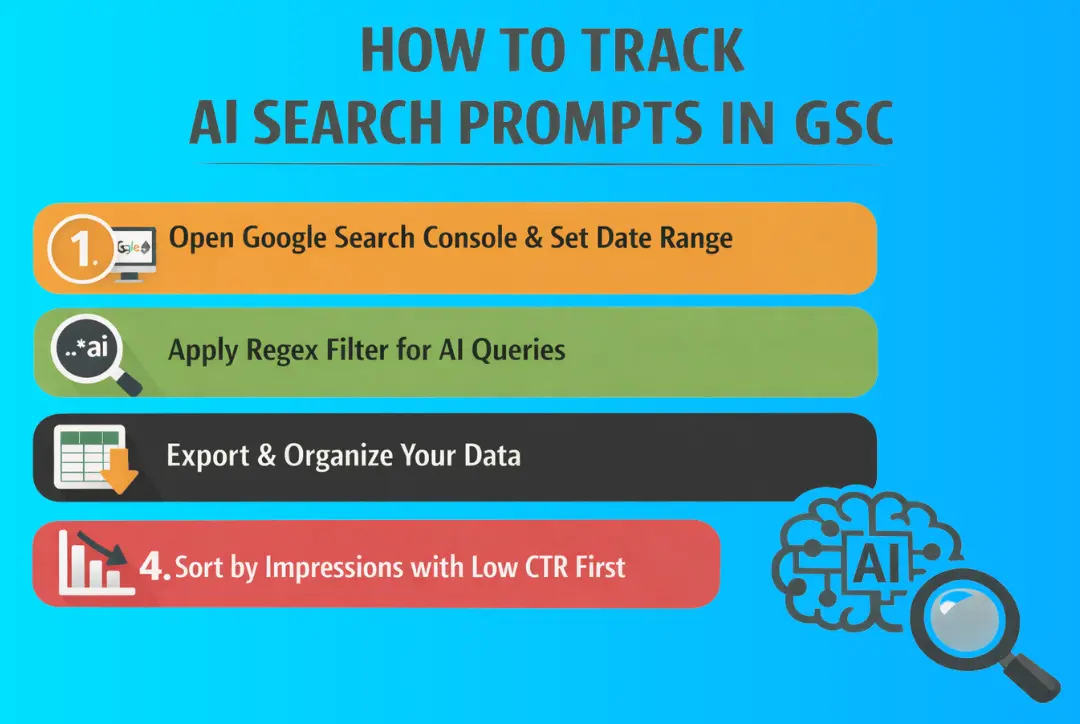
This takes under 20 minutes and gives you data most of your competitors do not know exists.
Step 1: Open Google Search Console And Set Your Date Range
Go to Performance, then Search Results.
Set your date range to the last 3 to 6 months. Shorter periods do not give you enough pattern data, especially when search behaviour keeps shifting over time.
Turn on all four columns: Clicks, Impressions, CTR, and Position.
Step 2: Apply The Regex Filter To Find AI Style Queries
This is the single move that unlocks everything.
Click New Filter then Query then Custom Regex and paste this exactly
^(?:\S+\s+){9,}\S+$
This filters your entire query list to show only searches that are 10 words or longer. These long tail search queries are the fingerprint of AI influenced buying behaviour. Nobody types a 14 word product question unless they are thinking exactly the way they would prompt an AI tool.
For an ecommerce brand this filter will surface queries like
- “Best eco friendly water bottle that keeps drinks cold for 24 hours and is under £30”
- “Where to buy wireless earbuds online with good bass and long battery life UK delivery”
- “Is [Brand Name] a reliable store for furniture and how long does delivery take”
These are your highest intent buyers. They are not browsing. They are one good answer away from purchasing.
Step 3: Export And Organise Your Data
Click Export then Google Sheets
You now have a working list of Google Search Console AI queries specific to your ecommerce store. This is real demand data from real customers who were close to a buying decision.
Step 4: Sort By Impressions With Low CTR First
Filter for queries showing 50 or more impressions and CTR under 2%.
When you review AI search prompts Google Search Console data, these are the searches where AI Mode is surfacing your site but keeping the click. Your job is to build content that answers the full question so well that the user chooses to visit your site directly.
How To Analyse Your Query Data Using AI Tools
Analyzing your search query data using AI tools like Claude AI and ChatGPT transforms raw Google Search Console exports into clear, actionable strategies across any niche.
Instead of just looking at keywords, you start understanding user search behavior patterns, query pattern analysis, and real search intent discovery. When you combine this with AI search prompts Google Search Console, you move from guesswork to data-backed decisions. Here is a practical, updated 2026 framework.
1. Analyze with Claude or ChatGPT
Before pasting your data, use Claude 3.5 Sonnet (preferred for long datasets) or ChatGPT. Both help turn messy query lists into structured AI content insights.
- Buying Intent Patterns
Prompt: “Here is a list of search queries my website appeared for. Group them by buying stages (Awareness, Consideration, Decision) and highlight high-intent queries.”
Goal: Spot queries closest to conversion and prioritize them for landing pages, ads, or content upgrades. - Content or Service Gap Discovery
Prompt: “Based on these queries, what topics, services, or content areas am I missing or underdeveloped?”
Goal: Find gaps where demand exists but your site is weak. This is pure search intent discovery in action. - Competitor Intelligence
Prompt: “Do any queries suggest users are comparing me with competitors or looking for alternatives?”
Goal: Identify comparison keywords and build “vs” or “alternative” pages to capture demand. - Trust and Reputation Signals
Prompt: “Do any queries show concerns about pricing, quality, delivery, or credibility?”
Goal: Turn these into FAQs, trust sections, or conversion boosters on key pages.
2. Advanced Layer: AI Search Ecosystem Tracking
Search is no longer just Google results. You are competing inside the AI search ecosystem where answers are generated, not just ranked.
To track this properly, use:
- Profound: Tracks brand mentions and sentiment in AI answers (Profound SEO tool)
- Peec Analytics: Measures how your brand appears in AI-generated responses
- SE Ranking: Tracks AI Overviews and hybrid search results
- Athena: Helps monitor AI-driven search performance (Athena SEO tool)
These are your prompt tracking tools for understanding visibility beyond traditional rankings.
3. Best Practices for 2026 Query Analysis
1. Understand How to Track AI Searches in GSC
You cannot directly see “AI traffic” in GSC. But you can infer it:
- High impressions + low CTR = AI answering without clicks
- Long conversational queries = AI-driven discovery
- Brand searches after discovery = indirect AI attribution
This is the real answer to how to track AI searches in GSC.
2.Combine Data Sources
Export queries and layer them with:
- CRM data
- Ad performance
- Content engagement
This gives deeper AI content insights, not just keyword data.
3. Compare Against Competitors
Paste competitor pages, ads, or reviews into Claude alongside your queries.
This exposes:
- Messaging gaps
- Positioning weaknesses
- Missed opportunities.
4. Avoid Generic AI Content
Use AI to find patterns, not to copy content.
Focus on:
- Unique insights
- Real examples
- Original perspectives
That is how you win in the modern AI search ecosystem.
How To Optimise For AI Search Across Every Industry
1. Build Around Questions
Your H2s should mirror the exact questions your audience is asking. Google Search Console queries show you those questions for free – use them as your content blueprint.
Structure Your FAQs
Google AI Mode consistently pulls from well-structured Q&A content. Add the FAQPage schema, so Search Console AI data works harder for your visibility.
Own The Comparison
Your audience is already comparing you to competitors online. Write that comparison page yourself, make your case, and capture that high-intent conversational search queries traffic before someone else does.
Answer Before They Ask
A comprehensive guide answering 12 specific audience questions will consistently outperform a feature list page inside the AI search ecosystem every single time.
Refresh Every Quarter
Export your long tail queries every 3 months and update your top pages. How to extract insights from Search Console regularly is what separates compounding SEO growth from stagnant rankings.
2. Watch Your Impressions
High impressions with near-zero CTR means AI Mode Google Search is using your content without sending the click. Sharpen your meta descriptions so readers have a clear reason to visit even after the AI answers partially.
3. Target Longer Queries
How to analyze long-tail queries inside GSC reveals exactly how real users think and phrase their needs. Build pages around those full sentence patterns, not shortened keyword versions.
4. Read The Trend Signals
AI search trends shift faster than traditional search patterns. Monitor which query themes are growing in impressions month over month and create content ahead of the curve rather than chasing it.
5. Use Your Data As Prompts
Feed your AI-generated search data back into your content strategy. The AI search prompts your audience uses inside Google are already visible in your GSC – treat every long query as a direct brief for your next piece of content.
6. Connect Data To Content
AI search prompts Google Search Console data only creates results when it directly informs what you publish next. Every insight you pull should connect to a specific page, update, or content gap you close within that same quarter.
Ready to turn your GSC data into a real business growth strategy? Talk to our team today.
Final Words
Search is no longer about rankings alone. Google AI Mode search data shows how users think, ask, and decide. If you read it right, you stop chasing keywords and start solving real demand. That shift is what drives consistent visibility, better intent matching, and stronger conversions in today’s AI-first search landscape.
At Mount Web Technologies, we help e-commerce brands and local businesses turn raw Google Search Console AI queries into revenue-focused strategies. From audits to execution, we align your content with real search intent so you attract the right traffic and convert it. Book your free audit today!
Frequently Asked Questions(FAQs)
Q1. How do I find AI search queries in Google Search Console?
Use regex filters to extract long conversational queries. Focus on high impressions and low CTR patterns, as these indicate AI-driven queries where your content is being used but not clicked.
Q2. What is Google AI Mode and how does it affect SEO?
Google AI Mode generates direct answers before traditional results, reducing clicks. It shifts SEO focus from rankings to visibility, impressions, and how well your content answers real user questions.
Q3. Why do I get impressions but no clicks in GSC?
This usually means AI Mode is using your content to answer queries directly. Users get their answer without clicking, especially for informational or comparison-based conversational searches.
Q4. How can I optimize content for AI-driven search?
Build content around full questions, use clear answers, add structured FAQs, and focus on intent. AI prioritizes content that directly solves user problems, not just keyword-optimized pages.
Q5. What are long-tail queries in AI search?
Long-tail queries are detailed, conversational searches, usually 8 to 15 words. They reflect how users interact with AI tools and often indicate high intent and specific needs.
Q6. How do AI tools like ChatGPT help in SEO analysis?
They analyze query data, group it by intent, uncover hidden patterns, identify content gaps, and suggest opportunities. This helps turn raw data into actionable SEO and content strategies.
Q7. What type of content works best for AI search?
Content that answers specific questions performs best. Buying guides, FAQs, comparison pages, and detailed explanations often rank higher. This is because they align well with conversational search intent.
Q8. How often should I update content using GSC data?
Update your content every three months by reviewing new query patterns. This keeps your pages aligned with evolving user behavior and helps maintain visibility in AI-driven search environments.