What you will learn in this blog
- What Google Business Profile optimization actually means in 2027 and why most businesses are doing it wrong
- Why your GBP calls dropped even though your Map Pack ranking looks fine
- The Google Business Profile call button missing issue explained and what to do about it
- 15 specific changes that improve Google Business Profile ranking factors and call volume
- A ready-to-use Google Business Profile optimization checklist 2027
- 7 direct answers to the most searched GBP questions
Your Google Business Profile is not a set-and-forget listing. It is the first thing a potential customer sees when they search for your service. In the USA, where mobile-first search dominates and local intent is high, a poorly optimized profile directly costs you calls, walk-ins, and revenue. Our Local SEO services help you turn that first impression into more calls and customers.
This guide covers 15 actionable changes for Google Business Profile optimization that are specific to 2027. No filler, no repetition of what you already know. Just the changes that move the needle on calls.
What Is Google Business Profile Optimization and Why It Matters in 2027
Optimizing your Google Business Profile means keeping your listing accurate and active. This helps Google confidently recommend your business when someone nearby searches for your services.
In 2027, this goes beyond filling in your address and hours. Google now reads your profile like a content asset. It evaluates E-E-A-T signals, review velocity, photo freshness, post activity, and how completely you have described your services. Whitespark’s 2026 Local Search Ranking Factors report found that the main GBP category, review velocity in the last 90 days, and weekly photo updates make up more than 70% of measurable ranking changes.
A fully optimized profile gets 80 % more search impressions and drives 12 % more calls compared to incomplete ones. For a GBP for a service area business, that gap is even wider because competition in local search is intensifying fast.
Important update: Google removed the one-tap call button from organic Map Pack results on mobile in late 2025. Users now have to tap into their profile first before calling. This is why many businesses are seeing a drop in calls even though their ranking has not changed.
Why Did My Google Business Profile Calls Drop Even With Good Rankings
This is the most common question from business owners right now. Three separate changes at Google have reduced call volume industry-wide, and none of them are your fault.
- Google removed the direct call button from organic map listings on mobile. Users now need one extra tap to reach your number, which causes a measurable drop in conversion.
- AI Overviews are now answering many local queries directly in search results. Searches that used to send users to profiles are now ending without a click.
- Google retired Business Messaging and Call History in mid-2024. Attribution became harder, and many businesses lost a contact channel they relied on.
Understanding why I am not getting calls from Google Business Profile starts here. Your profile may be fine. The environment changed.
How to Get More Phone Calls from Google Maps: 15 Changes That Work
Each change below targets a specific gap in most business profiles. Go through these as your Google Business Profile checklist and apply each one systematically.
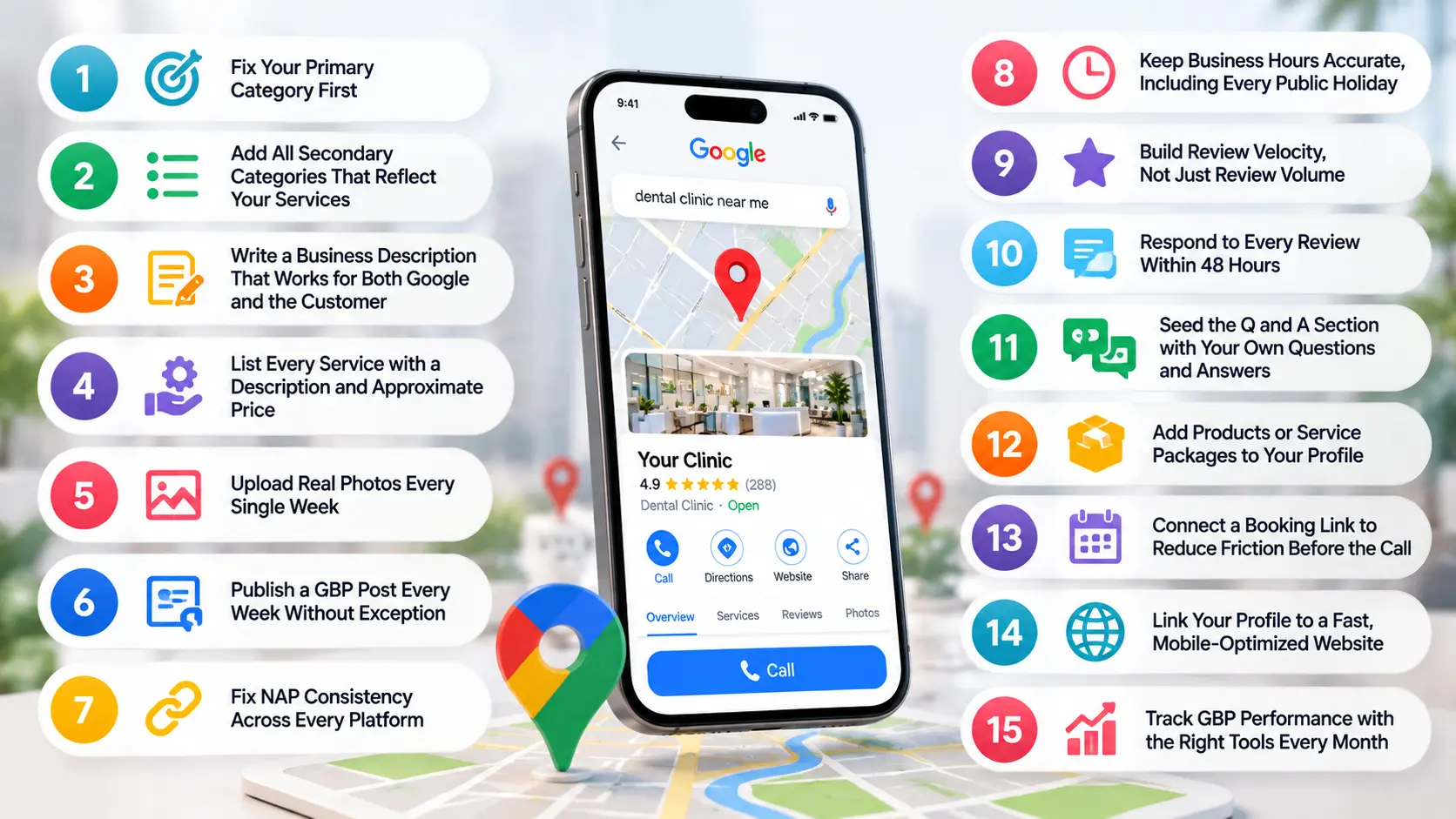
1. Fix Your Primary Category First
Your main category is the top factor for local search. Many businesses make a mistake by picking something too broad. If you are a plumber, do not select “Home Services.” Select “Plumber.” Google links your category to user queries. The more precise your choice, the more often your profile shows up in high-intent searches.
Before you change it, search for your top competitors in Google Maps and check what primary category they are using. Then select the most specific category that accurately describes your core service. You can always add broader categories as secondary ones.
2. Add All Secondary Categories That Reflect Your Services
Google allows up to nine additional categories on your profile. Most businesses use two or three and leave the rest empty. Every unfilled category is a missed opportunity to appear in more search queries.
Think about every service you offer and find the closest matching category for each one. For example, an AC repair business could add:
- Air Conditioning Repair Service
- HVAC Contractor
- Heating Contractor
- Ventilation System Service
Adding more categories makes your profile more relevant without needing extra content or effort.
3. Write a Business Description That Works for Both Google and the Customer
You have 750 characters. Most businesses waste them on generic statements like “we are a trusted company with years of experience.” That copy tells Google nothing useful and convinces no customer to call.
A strong description should include your main service, the cities you serve, one key difference, and a clear reason to reach out. Write it for a person first, and include your most important keyword naturally in the first two sentences. The description helps Google’s AI Overviews for local searches. So, clear and detailed writing brings more visibility benefits.
4. List Every Service with a Description and Approximate Price
Google uses your service details to match your profile to longer, more specific search queries. A profile that only lists “Plumbing” will rank for fewer searches. In contrast, a profile that includes “Pipe Leak Repair,” “Bathroom Fitting,” “Drainage Cleaning,” and “Water Pump Installation,” each with a brief description, will perform much better.
| What to Include | Why It Matters |
| Service name (specific, not generic) | Matches long-tail search queries directly |
| Short description (2 to 3 sentences) | Feeds AI Overview citations for local searches |
| Price or price range | Reduces friction, pre-qualifies callers |
Adding price filters out price-sensitive callers. This means you get more calls from genuinely interested prospects.
5. Upload Real Photos Every Single Week
Weekly photo uploads are now a confirmed ranking signal. Businesses that upload photos consistently see higher profile engagement, and profile engagement is something Google measures as a trust indicator. Stock images do not count. Google’s systems can detect generic imagery, and users ignore it.
What to photograph each week:
- Your team at work on a recent job
- Before and after shots of completed projects
- Your office, vehicle, or equipment
- Any certifications or awards displayed at your location
Even one genuine photo per week adds up to 52 fresh signals per year that your business is active and legitimate.
6. Publish a GBP Post Every Week Without Exception
Google introduced an “Updates from the merchant” surface in 2026, and post-recency became an official ranking signal. A profile that was last updated three months ago signals a stagnant business. A profile updated this week signals an active one.
Keep posts under 150 words. Every post should have one clear action for the reader, whether that is calling you, visiting your website, or reading more. Rotate between these post types to keep content fresh:
- A seasonal offer or promotion
- A completed project with a short result summary
- A common customer question answered directly
- A team update or milestone
7. Fix NAP Consistency Across Every Platform
NAP stands for Name, Address, and Phone. Your business details must match exactly across your Google Business Profile, your website footer, every directory listing, your social media pages, and any other platform where your business appears. Even minor variations hurt Google’s confidence in your listing.
Run a NAP audit at least once every six months and correct every discrepancy you find.
8. Keep Business Hours Accurate, Including Every Public Holiday
Inaccurate hours are one of the most common reasons a business loses calls from Google Maps. If a customer calls during hours you have listed as open and nobody answers, Google tracks that signal. Over time, it contributes to lower-profile trust.
There are regional public holidays that vary by state. Before every major national and state holiday, update your special hours inside your GBP dashboard. If you are closed on a day you are normally open, mark it. If you are open on a day you are normally closed, mark that too. This small habit prevents a large number of missed calls and bad user experiences.
9. Build Review Velocity, Not Just Review Volume
Ten new reviews in the last 90 days outperform 200 reviews, where the most recent one is from eight months ago. Google weights recency heavily in review signals. This is one of the most misunderstood aspects of Google Business Profile optimization for reviews.
Set up a simple review request workflow. Within 48 hours of completing a job or delivering a service, send the customer a WhatsApp message or email with a direct link to your Google review page. Most clients will leave a review if you make it easy and ask at the right moment. Aim for at least two to three new reviews every month at a minimum.
10. Respond to Every Review Within 48 Hours
Owner response rate and response speed are both tracked by Google as engagement signals. A profile with 50 reviews and 50 responses ranks better than one with 50 reviews and no responses, all else being equal.
When responding, avoid copying the same generic reply for every review. Thank you, [Customer’s Name], for choosing our [specific service] at [Your Business Name]. We appreciate your support! For negative reviews, stay professional, address the concern directly, and offer to resolve it offline. This shows potential customers that you are reliable and quick to respond. This can influence their choice to call you.
11. Seed the Q and A Section with Your Own Questions and Answers
Most businesses leave the Q and A section completely empty or let random questions from the public pile up unanswered. This is a missed opportunity on two levels. First, the Q and A content feeds directly into Google AI Overviews for local queries. Second, answering common questions before a prospect has to ask them removes friction from the decision to call.
Log in to your profile and add the five questions your customers ask most often. Answer each one clearly and in full. Good examples include questions about pricing, service areas, turnaround times, warranty, and whether you offer free estimates. Revisit this section every quarter and add new questions as your business evolves.
12. Add Products or Service Packages to Your Profile
Google’s Products section is separate from the Services section and gives you another way to build profile completeness, which is a direct ranking factor. If you offer defined packages, bundles, or tangible deliverables, list them here with a name, description, price, and photo.
For a digital marketing agency, this could be an “SEO Starter Pack” or a “Google Ads Management Plan.” For a home services business, it could be a “Full AC Service + Gas Top-Up Package.” These entries also give users something concrete to read and compare before deciding to call, which increases the quality of the calls you receive.
13. Connect a Booking Link to Reduce Friction Before the Call
If you use any appointment or booking software, connect it to your Google Business Profile through the booking link field. When a user can book directly from your profile, it removes the step of having to call first, which some customers prefer. It also signals to Google that your profile is technically complete and integrated.
For businesses where a call is the primary conversion, a booking link still helps. It captures prospects who were not ready to call but were willing to schedule something. Once they are booked, the call happens on your terms rather than theirs, which typically leads to better conversion rates.
14. Link Your Profile to a Fast, Mobile-Optimized Website
Google Business Profile vs website is not an either-or choice. Your profile drives traffic to your site, and if your site is slow or broken on mobile, that traffic converts poorly. Google also uses your website’s quality signals when evaluating your profile’s overall trustworthiness.
| Website Issue | Impact on GBP Performance |
| Page load time above 3 seconds | Higher bounce rate, lower conversion from profile traffic |
| No click-to-call button on mobile | Visitors who cannot call easily leave without converting |
| NAP mismatch between site and GBP | Reduces Google’s confidence in your listing accuracy |
| No local landing pages | Misses ranking opportunities for city-specific queries |
Check your Core Web Vitals in Google Search Console. If your LCP or INP scores are failing, that is hurting both your website rankings and the downstream performance of your GBP traffic.
15. Track GBP Performance with the Right Tools Every Month
You cannot improve what you do not measure. Most businesses glance at the basic GBP Insights dashboard and stop there. That data only tells you impressions and clicks. To understand what is actually driving calls, you need a fuller picture.
Use these three tools together:
- Google Search Console shows which queries are sending traffic from your profile to your website and how that traffic behaves.
- Google Analytics 4 tracks what profile-referred visitors do on your site and whether they convert. Set up a goal for phone number clicks.
- BrightLocal tracks your Map Pack ranking by keyword and location.
Review these dashboards once a month. Look for queries where you appear but do not get clicks, and queries where you rank in position 4 or 5. Those are your fastest optimization opportunities.
Google Business Profile Ranking Factors You Cannot Ignore in 2027
These are the factors that directly determine whether your profile shows up in the top 3 Map Pack results.
| Ranking Factor | What Google Looks For | Impact Level |
| Primary Category Match | Exact alignment with the search query | Very High |
| Review Velocity (last 90 days) | Consistent flow of fresh, genuine reviews | Very High |
| Star Rating | Star rating impact on local search visibility is direct. Profiles below 4.0 lose clicks fast | High |
| Profile Completeness | All fields filled including services, products, hours, attributes | High |
| Photo Upload Frequency | Weekly uploads signal an active business listing | High |
| Post Recency | Profile update activity is now a 2026 ranking signal | Medium-High |
| NAP Consistency | Exact match across all online directories and website | Medium-High |
| AI Search Citations | Structured content that feeds Google AI Overviews | Growing |
GBP Optimization Checklist 2027 for Service Area Businesses
If you operate across multiple cities without a fixed shopfront, your GBP setup needs one specific approach. Service area businesses must hide their address and define service regions correctly. Here is what to confirm.
- Verification completed through video or postcard, not a third party
- Service area set to cover your actual operating zones, not your entire state
- Address hidden if you do not receive customers at your location
- Phone number is a local or mobile number, not a toll-free one
- At least 10 photos uploaded including team, equipment, and completed work
- All services listed with descriptions that include city names naturally
- One GBP post published every week with a clear action for the reader
- Review request sent to every client within 48 hours of job completion
How Long Does Google Business Profile Optimization Take to Show Results
Most businesses want a clear answer here. Based on real client data across service businesses, here is what the timeline typically looks like.
| Action Taken | Typical Time to See Results |
| Profile completeness and category fix | 1 to 2 weeks |
| Consistent review generation (10 plus in 90 days) | 4 to 8 weeks |
| Weekly photo and post activity | 6 to 10 weeks |
| Full NAP consistency across directories | 4 to 12 weeks |
| Map Pack position improvement | 6 to 16 weeks depending on competition |
There is no shortcut. But every change stacks. A business that applies all 15 changes consistently will outrank one that applies 3 intermittently, every time.
Pros and Cons of Google Business Profile Posts
GBP posts are now a ranking signal, but they are still underused by most businesses. Here is the honest picture.
| Pros | Cons |
| Free visibility directly on Google Search and Maps | Posts expire after 7 days unless refreshed |
| Signals active business to Google’s algorithm | Low organic reach on their own without a strong profile |
| Can appear in AI Overviews for local queries | Images must be high quality or posts look unprofessional |
| Great for promotions and seasonal offers | No scheduling tool inside GBP; requires manual effort or third-party tools |
How Do Reviews Influence Google Business Profile Ranking
Reviews are one of the clearest levers in Google Business Profile optimization. They influence your ranking on three levels.
First, volume and velocity. Google rewards profiles that receive reviews consistently, not in bursts. A review every 10 days is more valuable than 20 in one week and none for 3 months.
Second, content. Reviews that mention your service name, city, and outcome give Google structured context about what your business does and where. These naturally keyword-rich reviews contribute to your profile appearing for more queries.
Third, your responses. Owner responses are weighted as an engagement signal. Responding within 48 hours helps. Mention your service and address the customer’s feedback too. This is what local SEO experts consistently point to as underutilized, and the data backs it up.
Want More Calls from Google? We Can Help.
At Mount Web Technologies, we conduct complete Google Business Profile Optimization. We also manage Local SEO from start to finish for service businesses. If your GBP is not generating enough calls, we will find exactly why and fix it. Get Your Free GBP Audit!
Frequently Asked Questions
Q1. What is Google Business Profile optimization?
It means making your Google listing accurate, complete, and active so Google shows your business to nearby searchers and drives more calls.
Q2. Why did my Google Business Profile calls drop in 2027?
Google removed the direct call button from organic map results on mobile, and AI Overviews now answer many local queries without a click to your profile.
Q3. Why is the Google Business Profile call button missing?
Google removed the one-tap call button from free organic listings in late 2025. Users now must open your profile to find your number.
Q4. How to get more calls from Google Business Profile?
Complete your profile fully, get reviews consistently, post weekly, add all services, and ensure your phone number is correct and visible inside your profile.
Q5. How long does Google Business Profile optimization take?
Category and profile fixes show results in 1 to 2 weeks. Full Map Pack ranking improvements typically take 6 to 16 weeks based on competition level.
Q6. What are the top Google Business Profile ranking factors?
Primary category match, review velocity in the last 90 days, profile completeness, weekly photo uploads, and NAP consistency across all platforms.
Q7. How do reviews influence Google Business Profile ranking?
Consistent review volume, keyword-rich review content, and fast owner responses all signal trust and relevance to Google, which improves your local ranking.